Connect Rewardata to Microsoft Power Platform
Pull standardised pay, tax, living-wage, retirement and cost-of-living data for 200+ countries straight into your Power Automate flows, Power Apps, Logic Apps, Copilot Studio agents and ChatGPT Custom GPTs — no scraping, one consistent API.
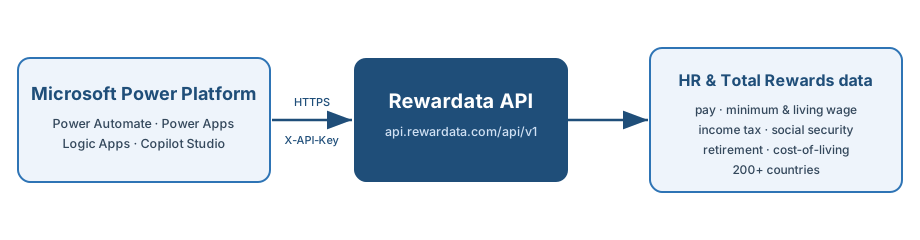
Before you start
https://api.rewardata.com/api/v1 — HTTPS only.
Send your key in the X-API-Key header. Every data call needs a valid, approved key — without one (or while your account is still on the waiting list) /data returns 401 and no values. The catalogue endpoints (/countries, /fields, /categories) are public.
Three ways to connect
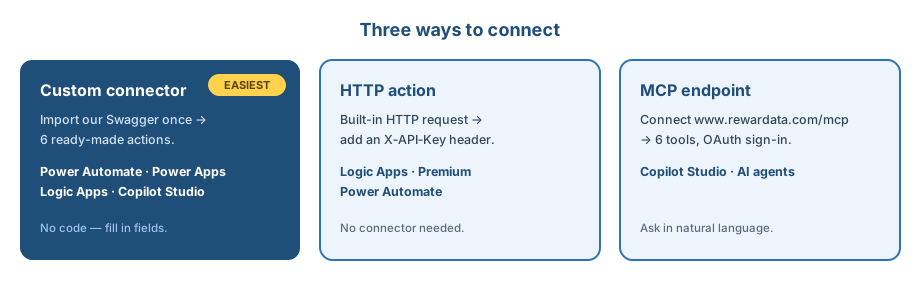
The custom connector is the easiest — import it once and you get six ready-made
actions (QueryData, BulkQuery, plus country/year/category/field pickers).
The generic HTTP action needs no connector. Copilot Studio can also
talk to our hosted MCP endpoint in natural language.
- Download the connector definition: rewardata-power-automate.swagger.json.
- In Power Automate (or Power Apps), go to Data → Custom connectors → New custom connector → Import an OpenAPI file, and upload the file.
- Review — host
api.rewardata.com, securityAPI Key (X-API-Key)— then Create connector. - Create a connection: paste your
rwd_…API key when prompted. Done — the actions are now available in any flow/app.
Automate look-ups in any flow — e.g. when a new hire is added, fetch the country's living wage and effective tax rate.
With the connector
- Add a step → search Rewardata → pick QueryData.
- Fill in country (e.g.
DEU), field (e.g.living_wage_net_monthly), year. - Use the returned
valuein later steps (Excel, SharePoint, Teams, email).
Without a connector (HTTP action)
Method:  GET
URI:     https://api.rewardata.com/api/v1/data?country=DEU&field=living_wage_net_monthly
Headers: X-API-Key: rwd_your_keySurface live country data inside a canvas app — e.g. a relocation calculator.
- In your app, Data → Add data → Connectors → choose your Rewardata custom connector.
- Call an action from a control. Example formula on a button/label:
// returns the rows for the chosen country/field
ClearCollect(
    rewards,
    Rewardata.QueryData({country: cmbCountry.Selected.Value,
                         field: "average_monthly_earnings"}).value
)For server-side / IT-owned integrations. Two options:
- HTTP action — add an HTTP action with method
GET, the URL above, and anX-API-Keyheader. No connector needed. - OpenAPI import — Logic Apps can consume our spec directly: api.rewardata.com/openapi.json (or the downloaded Swagger).
Bulk: one call for many rows
POST https://api.rewardata.com/api/v1/bulk-query
X-API-Key: rwd_your_key
Content-Type: application/json

{ "queries": [
    {"country":"USA","field":"income_tax_rate_at_average_wage","year":2025},
    {"country":"FRA","field":"income_tax_rate_at_average_wage","year":2025}
] }Let a Copilot answer reward questions in natural language. Two routes:
- Connector action — add the Rewardata custom connector as a tool/action in your Copilot, so it can call
QueryData. - MCP endpoint — connect our hosted server
https://www.rewardata.com/mcp(OAuth sign-in). The Copilot then has six tools (query_hr_data, compare_countries, list_fields…) and can answer e.g. "compare the minimum wage in Poland, Spain and Portugal."
CLI clients use the same endpoint with a header: Authorization: Bearer rwd_your_key. See the MCP section.
Give a Custom GPT live access to Rewardata so it answers reward questions with real numbers. Custom GPTs use an OpenAPI schema (an "Action") plus your API key — paste the schema, set the key, done.
- Create a GPT — in ChatGPT, open Explore GPTs → Create, then the Configure tab.
- Add an Action — under Actions → Create new action, in the Schema box click Import from URL and paste
https://rewardata.com/static/connectors/rewardata-openai-actions.json
(or download it below and paste the JSON directly). - Authentication — choose API Key, Auth Type: Custom, Header name
X-API-Key, and paste yourrwd_…key. - Save & test — ask e.g. "What's the statutory minimum wage in Germany, and how does it compare to France and Spain?"
Paste this into the GPT's Instructions
You are a Total Rewards assistant with live access to the
Rewardata API (pay, tax, social security, cost of living,
living wage, hours, leave, pensions and FX for 200+ countries).

- To find exact codes, call listCountries, listCategories
  and listFields before querying.
- Use queryData for one value (country + field [+ year]);
  use bulkQuery to compare many countries/fields at once.
- For currency conversion, call fxRate.
- Always report the value with its unit, year and source.
- Never invent numbers. If the API returns nothing, say so.
Prefer MCP? ChatGPT's Connectors / Deep Research (Pro, Team, Enterprise) can connect to our hosted MCP server at https://www.rewardata.com/mcp instead — see the MCP section. MCP can't be pasted into a Custom GPT; Custom GPTs use the Action schema above.
Pull it straight into Excel (Power Query)
Excel's built-in Power Query (Get & Transform) pulls the API into a refreshable table — no add-in, no code project. Go to Data → Get Data → From Other Sources → Blank Query → Advanced Editor, paste the query, then Close & Load. Re-pull anytime with Data → Refresh All.
- Get your key from your profile (
rwd_…). - Paste the query opposite into the Advanced Editor — your key goes in the
X-API-Keyheader. - Close & Load → it becomes a table you can Refresh on demand.
For many countries/fields in one go, point it at POST /api/v1/bulk-query.
Note: =WEBSERVICE() only works for the public catalogue endpoints — it can't send the
X-API-Key header that /data needs.
let
    Source = Json.Document(
        Web.Contents(
            "https://rewardata.com/api/v1/data?country=DEU&field=average_annual_wage",
            [Headers=[#"X-API-Key"="rwd_your_key_here"]]
        )
    ),
    rows  = Source[data],
    table = Table.FromList(rows, Splitter.SplitByNothing()),
    out   = Table.ExpandRecordColumn(table, "Column1",
              {"country","year","value","unit","source_name"})
in
    out
The key is saved inside the workbook — keep the file personal (or store the key via Power Query's Data source settings), and rotate it if a shared workbook leaks.
A typical flow

"Cost a new role in any country." Trigger on a new SharePoint/Excel row → call
QueryData (or /snapshot for everything at once) to pull the average wage,
effective income tax, living wage and statutory on-costs → write the fully-loaded number back to the row.
Tip: GET /api/v1/snapshot returns every country with its currency and the most-used
fields in a single call — ideal for refreshing a whole reference table on a schedule.
Downloads & references
- Power Automate connector (Swagger)
- ChatGPT Custom GPT — OpenAPI Actions schema
- OpenAPI spec (for Logic Apps / custom connectors)
- Interactive API docs
- Data dictionary — every field name + description
Troubleshooting
- 401 Unauthorized — check the connection's API key (
X-API-Keyheader). - 401 / no data back — the request has no valid key, or the account isn't approved yet (e.g. still on the waiting list). Check the
X-API-Keyheader and that your account is active. - 429 / rate limit — free tier is 60/min · 250/day; use
/bulk-queryor/snapshotto reduce calls. - Field names — copy exact codes from the dictionary.
Ready to build?
Grab your API key and the connector — you'll have data flowing in minutes.
Get an API key Download the connector